Best Photo And Video Editing Software For Mac
Mac Photo Editor from Movavi: Create Flawless Visuals Photos capture the precious moments of our lives. Unfortunately, it’s not easy to take high-quality pictures on the first try – it’s not often that you actually want a random passerby or a misplaced finger to feature in your photos.
Best Photo And Video Editing Software For Mac
And you know that good lighting would really enrich the colors in your pictures. And then there are the photographs that tend to fade and yellow with time. To fix these problems, you need Movavi Photo Editor for Mac – a simple program that’s equally good both for beginners and professionals.
By Apr 27,2018 20:07 pm In the current world, a lot more people are increasingly viewing and sharing photos and videos every day on social media. A great way to achieve this is putting the investment in time and money into your photo video editor software. However, with the tons of photo and video editing software coming out every now and then, it can be hard determining which one suits you best. This article will help you out to edit photo and video in an easy way. The Best Photo Video Editor for Mac and Windows Users The Best Photo and Video Editor - Filmora Video Editor Luckily, you can now get everything you need to create the best videos and photos ever and amazingly, all in one popular software package.
Best Photo Editing Apps For Mac
(or ) is the easiest way to create, edit, and automatically turn your videos and photos into magical videos and instantly share them with your family and friends. Step 2: Import Photos And Videos to Program After launching the program, you can now start importing your video, audio, or photos. There are three different ways. The first one is by clicking on the 'import media files here’ button located on the left side of the software main window. The second one is dragging and dropping the media files to the main window directly, and the third one involves clicking on the 'File’ button located on the upper part of your screen and then selecting either 'Import Media'. Step 3: Edit Photos and Videos Filmora Video Editor supports nearly all video, audio, and photo formats, therefore, you won’t have to encounter any incompatibility issues.
With my Kindle I had the issue that I would connect it to a PC and it would switch into drive mode. Kindle driver for mac.
AVS Video Editor. AVS video editor is one of the popular video editor for PC windows OS. It is one of the best software’s to quickly edit a video with a large variety of effects. This is the best, cross-platform (Mac and Windows) premium video editor. 9 GoPro Video Editing Apps Before we get into the full set of programs, there are also a few mobile apps for editing GoPro video.
Tip: Click anywhere in the page you want to delete, press Ctrl+G (Option+⌘+G on Mac), and in the Enter page number box, type page. Press Enter on your keyboard, and then click Close. Verify that a page of content is selected, and then press Delete on your keyboard. How to remove a second page in word 2016 for mac. “I cannot delete third page on Word document (Office 2016 for Mac). The third page will not delete. I followed the instructions on the deleted the page breaks but that did not work. Double-click the break you want to remove. Although you can't remove automatic page breaks, you can adjust where they land and thus keep specific paragraphs or lines together.
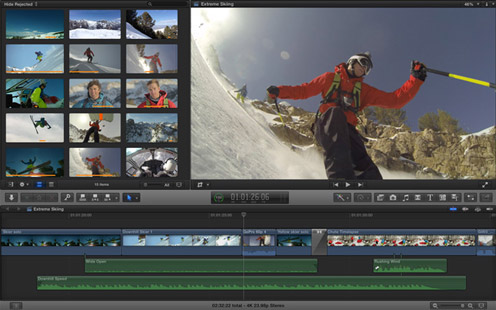
You will just have to drop your video or photo on to the timeline and begin cropping, trimming, splitting, or merging. After that, you can use the various stunning effects and editing features like motion graphics, green-screen, transitions, and split screen to personalize your video or photo. When you are done, move the cursor at the beginning of your video in the timeline and then double click in order to preview it. • Has all the video editing tools including splitting, trimming, cropping, rotating, combing and amazing effects like filters, motion graphics, titles, transitions, and overlays. • You can export the result video into any video format that you like, burn it into a DVD, and even share it on websites like YouTube, Face book, Vimeo. • Comes with the voiceover feature for recording voice-over for your video and attaching onto it. • Features record computer screen for recording your computer screen or running video games.
Best Mac Photo Editing
Top 10 Best Photo Video Editor Software Nowadays we store our beautiful memories and moments in our camera and later use it to remember those glorious days. But sometimes we need to edit those memories, pictures or videos so that it becomes more attractive and valuable to everyone. We are always in search of such photo video editor software which will still make things more comfortable and perfect for us. A hard to learn software isn't something people are looking for; they want such photo video editor software which will not only give beautiful effects to your photos and videos but also make it as per the user demands. So below are the top 10 videos and photo editor you will love to use. Top 10 Best Photo Video Editor Software 1.