How To Enter A Color Code On Powerpoint For Mac 2016
Keyboard Alt-code commands can insert a ¹, ² or ³. For example, to create a squared symbol, hold down the Alt key and use the number keypad to enter the numbers 0178. To create a power of one symbol, switch the number to 0185; use 0179 to create a cubed exponent. How to Embed an iframe in a PowerPoint Presentation. If you only want to insert a certain element of the web page, then find its embed code. To insert an element of a web page to your presentation, select and copy the URL from the embed code.
PowerPoint for Office 365 for Mac PowerPoint 2019 for Mac PowerPoint 2016 for Mac PowerPoint for Mac 2011 You can customize and change fonts and character spacing (also known as kerning) on the Home tab in the Font group. This illustration shows the features available in the Font group: 1. Click the arrow to scroll through and select a style. Click the arrow to choose a font size.
Or, select the number in the box, enter a new number, and press RETURN. Increase or Decrease Font Size. Click Increase Font Size or Decrease Font Size to incrementally change the size of selected text. Clear All Formatting. Click to return selected text to its default formatting.
Bold, Italic, and Underline. Click Bold, Italic, or Underline to apply to selected text. Click to make selected text appear crossed out. Superscript and Subscript. Click to make selected text smaller and slightly above (superscript) or below (subscript) the normal line of type. Character Spacing (kerning). Click the arrow to choose how tightly or loosely spaced your text appears.
Reinstall office 2010 professional plus. So you stay productive while on the go. Microsoft OFFICE 2010 Pro Plus PRECRACKED 32bit/64bit Microsoft Office 2010 Professional Plus x64 and x86 14.0.4743.1000 Full Activator Download particular program from Microsoft OFFICE 2010 Pro Plus. Office 2010 lets you access and edit documents stored on a server while you’re offline with SharePoint Workspace 2010, and then automatically syncs these changes when you’re back online. Use Office 2010 virtually anywhere: PC, phone, browser With Microsoft Office 2010, you can review and do minor editing on Word, Excel, PowerPoint, and OneNote 2010 documents, virtually anywhere, by using Office Web Apps from more locations on more devices. Keep your people productive on the go.
 Click More Spacing for fine-tuned control over character spacing. Click the arrow to change casing of selected text. Choose from Sentence case, lowercase, UPPERCASE, Capitalize Each Word, and tOGGLE cASE. Click the arrow to select a font color.
Click More Colors for advanced color options.
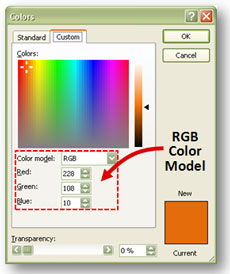
• • • • • • If you need to design a and it requires to use custom colors then having the chance to set RGB colors in PowerPoint can be very useful. For example if you need to change the background template design or set custom colors for Shapes or gradient effects. In Microsoft PowerPoint for Windows we can change or set RGB colors easily. While changing the background or color properties, click More Colors and then choose Custom tab in the dialog box. This will show a popup where you need to choose RGB color model and then you can enter the RGB values. In PowerPoint for Mac or Office 2011 you can also set a custom color by changing RGB values.
Color Picker
While changing the background color under Solid or Gradient section choose the More Colors option under color palettes. That option will open the Mac OS color picker. Using the Mac OS color picker you can set the RGB values by selecting the buttons along the top that looks like slides. Then click the popup and choose RGB sliders. Now enter the RGB values. Related Posts • Sometimes when you need to design a PowerPoint presentation based on the corporate identity or organization visual identity then you need to pick the right • To make a Pie Chart in PowerPoint you just need to insert a new chart and choose the pie chart type in the dialog box. 