Image Editor For The Mac
Apple’s Mac computers are some of the most popular image editing machines worldwide thanks to their stability and performance. However, what most people don’t realize is that when they buy a Mac, they’re also getting a pretty powerful image editor for free! This app, called Preview, is a built-in photo editor for Mac computers that can be used for most basic corrections without spending a penny on a more capable program. More advanced photo editing programs, like, provide much more control but have to be downloaded and installed separately, which may not suit some users. For such users, free online photo editors have been the way to go for a long time.
Disclaimer: Paintbrush is not intended to replace Adobe Photoshop or other high-end image editors. Instead, it aims to fill the need for a basic, streamlined, and Mac-native image editor. Whether you need to quickly crop a photo, add some text to an image, or just have fun doodling, Paintbrush has you covered. It is available for Mac OS X, Microsoft Windows, Linux and BSD under the GNU GPL license and supports a variety of video, image and audio formats, including AVI, DVD compatible MPEG files, MP4, MOV, ASF, JPG, AAC, AC3, etc. High compatibility with many video formats is the highlight of this free video editing software for Mac. Image Tricks is a fun and easy to use free image editor for Mac OS X. It is an application that encourages experimentation and offers the ability for a wide range of. How can the answer be improved? With the launch of iOS 12 this past September, Apple brought RAW editing support to the built-in iOS Photos app for the first time. The feature is a welcome addition, but iPhone users shooting RAW.
Platform Availability: Mac OS X. SEE ALSO: 10 Best Audio Recording Software. Less reading, more listening! Text to speech (TTS) software take almost all the hassle out of consuming digital textual, making the entire thing faster and more convenient. And as seen above, there are plenty of such solutions available. Their software is simple to understand and easy to use for a non-computer expert like myself. The US English voices Julie and Paul are very high quality TTS voices and they sound the most natural to me. There are really only two options for dictation software when you are using Mac OS X. There is basic dictation software built into OS X, and there is a program developed by Nuance called Dragon Dictate for Mac. Dictate is the successor to a program named iListen which MacSpeech used to produce. The Best Free Text-to-Speech Software app downloads for Mac: Voice TextSpeech Pro Elements Toau SpeechMirror Speechissimo Listen Later. 
But free online solutions also come with their own hassles. You don’t always have internet access to use an online editor, so it’s better to have something on your system that you can use anywhere. That’s the beauty of Preview, as it offers basic photo editing capabilities for free and is always available as a pre-installed program. The basics of Preview As its name suggests, Preview is mainly used to open images on a Mac.
Mac Os Image Editor
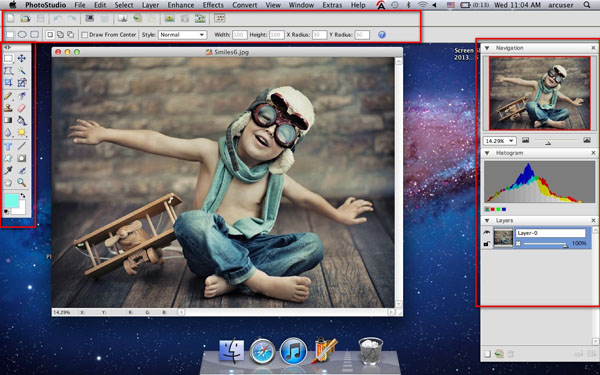
Image Editor For Mac -photo
By default, every time you click on an image it opens in Preview. The only limitation is that Preview can only open compressed images and can’t open RAW files, unlike other software like Luminar, which has a. Sierra download for mac. You can also use Preview to transfer photos directly to your computer from a camera or even a scanner. Other than for viewing photos, Preview also helps you edit images. Its Adjust Size tool is handy when you need to alter the dimensions of your photos.