Unlock Track Changes In Word For Mac 2016
Try deleting the preference files. I use track changes all the time on MS Word on my Mac and it normally works fine.
Track Changes Function in MS Word for Mac 2016 Prior Versions of Word for Mac allowed for user preferences to 'stick' between documents. I edit hundreds of documents a month, and for some reason the powers that be have decided that Word users must now perform the following functions EVERY TIME they open and begin to edit a document. It appears that Track Changes in Word 2016 no longer displays in the margin balloons the time when an edit was made, only the date. Password manager for mac free. I have come to depend on that timestamp for my work.
Also you say this is reproducible behaviour on different files so it is clearly something to do with your specific installation. I suspect it might be due to a corrupt preferences file. Anyway it would be worth testing this by removing the word preference files - try both the ~/Library/Preferences/com.microsoft. Files ~/Library/Application Support/Microsoft files.
Sublime Text is available for Mac, Windows and Linux. One license is all you need to use Sublime Text on every computer you own, no matter what operating system it uses. Sublime Text uses a custom UI toolkit, optimized for speed and beauty, while taking advantage of native functionality on each platform. Sublime text for mac download.
I have found ACD Systems - Photo Editing Management Software (ACD Systems - Photo Editing Management Software) best suited for both photography and digital assets management replacing an outdated bridge. If you use it for photos only - lightroom might be enough, though. Bridge CC gives you centralized access to all the files and assets you need for your creative projects. Organize personal and team assets, batch edit with ease, add watermarks, set centralized color preferences, and even upload your photos to Adobe Stock. Best software for photo management. Batch-editing digital-asset-management document-management file-organizer image-browser image-watermarking media-organizer metadata photo-management Adobe Bridge (sometimes referred to as Bridge) was added by in Oct 2010 and the latest update was made in Aug 2017. (macOS only) On your Mac machine, you can configure Adobe Bridge to automatically open Photo Downloader when a camera is connected to the computer. Choose Adobe Bridge > Preferences. In the Behavior area of the General panel, select When A Camera Is Connected, Launch Adobe Photo Downloader.
Track Changes In Word 2017
If you have more than one user account set up on your machine you could start off by seeing if the problem occurs on all user accounts.
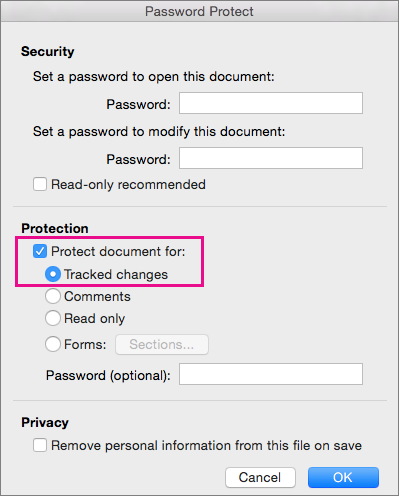
How to lock your document from editing – the whole document or just part of it. Allow some people to edit the document but others can only view it. There is also a useful option to ensure that the Track Changes is always on. This ensures no one sneaks unnoticed edits into a document.
Read only x 2 There’s two ways to make a Word document ‘Read only’ – meaning that it can’t be edited, only viewed. Windows Any file can be marked as ‘Read only’ at the system level. This means the file can be opened and viewed but no changes can be made to the file. To do that, close the document in Office. In Windows Explorer, right-click on the file, choose Properties General and check the ‘Read-only’ box.