When On Microsoft Outlook 2011 For Mac, If I Try To Search For An Email, I Get No Results.
I'm trying to configure my Microsoft Outlook 2011 MAC email program to send and receive my att.net account. I can't seem to find the configuration information. I tried using the pop.att.yahoo.com port 995 and smtp.att.yahoo.com port 465 configuration as indicated in a previous version of Outlook. I can receive email sent to my att.net email account but I can't send from att.net email account using Outlook 2011 MAC Version. I receive Error Code: 3253. Has anyone run across this issue and found a solution to this error? Please advise.
Not shockingly, i am also having the same problem with AT&T. I just spent another hour on the phone and in the end I was told 'We only support webmail, we do not support POP mail, if you need help with that you have to contact Conect Tech'.
The program is called diff, and it’s quite simple to use. There are other third-party GUI tools as well, but there’s actually a free folder comparison tool built into every Mac—it just requires a quick trip to Terminal to put it to use. Back in 2006, (part of Apple’s Xcode developer tools), which can do just that. Have you ever wanted a quick way to compare two directories (folders), in order to see which files may differ between the two? Folder compare tool for mac. Launch Terminal (in Applications -> Utilities), and then use the cd command to change to the directory containing the folders you’d like to compare.
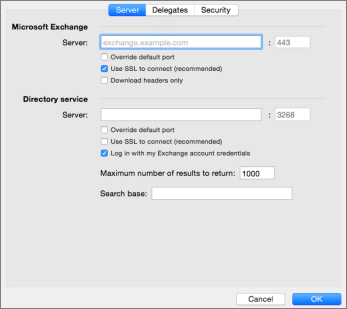
Even though the website says they provide POPP mail service. They change their settings causing everyones client email to stop working, and we have to give them more money. It is insane. The only workaround i have found is to log into webmail, then log out of webmail and then try to log into your email client(Outlook, mac mail, etc.) works about 50% of the time. It's a weak option, but it is the best I could find since AT&T refuses to address their problem. In Oulook go to tools accounts click bottom + sign click e-mail add your email address add password uncheck the box Configure automatically incoming server is inbound.att.net check box overide default port, then add 995 check use SSL to connect outgoing server is outbound.att.net check box overide default port, then add 465 check box use SSL to connect then click More options.
How to make excel 2016 for mac work with data query to web. Excel Web Query '.iqy' Files The real key to creating a dynamic excel web query is to create your own '.iqy' file. Paramname= value ¶m2=value2 You can create the file using a simple text editor! It's not always going to be better, and it's not always going to work, but it's worth a try, especially since a simple web query could boost your productivity! Most text editors will save a new file with the.txt extension, but you can change the extension to.iqy after you create your text file. In it's basic form, the '.iqy' file is simply a TEXT file with three main lines: WEB 1?
Free design software for mac. You can make changes in the app and share the results with clients, colleagues, friends, and family. Floor Plans, Screenshots and Video You will be able to export a floor plan in PDF, JPEG, 360° Panorama JPEG, TIFF, PNG or BMP file format. You can also export a snapshot of your interior view to JPEG, TIFF, PNG, and BMP.
I have only one user out of approx. 300 that is not getting full search results from Outlook 2020 in Online non-cache mode on a Citrix/Term Windows 2008 R2 server. Results do not go past 7/28/16 and if they just type a keyword, no results display. Symptoms: In Microsoft Outlook for Mac 2011, you receive a “No Results” message when you try to search for an email message. Additionally, when you search by using the Mac OS native Spotlight Search, your search may not be successful.
Under Authentication scroll to use incoming server info then click ok close the window and go to Home on outlook and click Send/Recive, it should work. Pamelaz, I'm running Apple OS X v10.8.2 (12C60) and MS Office for Mac 2011, v14.2.5 (121010). I have followed the advice and settings from this thread, worked with the 24/7 esupport help team and I'm dead in the water (sts). I receive the following error, 'Authentication failed because Outlook doesn't support any of the available authentication methods', with the following details - Could not retrieve mail. Account name: 'Att', Error code: - 17897. I've been using Outlook email features for years with cox and really need this to work with our new att.net account.