Epson Stylus Photo R3000 Printer Driver For Mac
Download Epson Stylus Photo R3000 Driver- To fix problems from your drivers, you will need to be aware of the particular type of the Printer system you are having troubles with (if you are deciding to update the specific Drivers personally, just for intelligent Driver revise the Driver Update Resource will find the actual Driver for you). Epson Stylus Photo R3000 printer driver is portable printer product that you can set in only small space at home. Find the best options of features and driver to use. Find the best options of features and driver to use.
MMOs are massive in so many ways. Across hundreds of games, they bring in 10 billion dollars a year and have audiences that expand well into the tens of millions. Best mmorpg for mac 2015. But beneath those hours is the beautiful ideal that anyone from anywhere can become anything within the confines of these virtual worlds (and grind out some epic loot in the process). In just World of Warcraft, players have collectively logged more time than our species has spent evolving on this planet—over 6 million years.
– Epson Stylus Photo R3000 Driver is software that works on a computer to be able to connect with the Epson Stylus Photo R3000. When the develop control from the computer is sent out to the printer, Epson Stylus Photo R3000 Driver will certainly intermediary and also convert details from the application right into a terms framework that can be identified by the Epson Stylus Photo R3000. Epson Stylus Photo R3000 Driver printer have to be relying on the os used on computer systems, such as Windows XP, Windows Vista, Windows 7, Windows 8, Windows 8.1, Windows 10, Linux system or Mac OS. It is truly essential to make use of the ideal driver to avoid problems when printing. Epson Stylus Photo R3000 Driver System Requirements & Compatibility Many printer drivers, utilities and applications for different OS are available to download free of charge from the support pages of the Epson website. This article explains how to navigate the Epson website to locate and download them for your product.
Our software provides the best monitoring solution for employers, parents and even personal users who understand the importance of protecting their businesses, personal information and loved ones. FlexiSPY computer monitoring software is an application that you install on to a PC or Mac to supervise the processes and activities that take place on a particular machine or computer network. With over 40 features - and more being added every day - FlexiSPY gives you more options than any other competitor.  What Is Computer Monitoring Software?
Microsoft Windows 10 (32bit / 64bit), Microsoft Windows 8.1(32bit / 64bit), Microsoft Windows 8(32bit / 64bit), Microsoft Windows 7 (32bit / 64bit), Microsoft Windows Vista(32bit / 64bit), Microsoft Windows XP SP2 or later, Microsoft Windows XP x64 Edition, macOS Mojave v10.14/macOS Mojave v10.14/MacOS High Sierra v10.13 / MacOS Sierra v10.12 / Mac OS X v10.11 / Mac OS X v10.10 /Mac OS X v10.9 / Mac OS X v10.8 / Mac OS X v10.7 / Mac OS X v10.6 / Mac OS X v10.5 / Linux Operating System. Epson Stylus Photo R3000 Driver, Software, Firmware & Manuals Choose your OS that listed below to download the latest downloads including software program, manuals, drivers or firmware.
When your Epson Stylus Photo R3000 page loaded, Please uses the tabs to browse between the various web content types. Download and install drivers, software application, firmware, and Manuals as well as obtain access to online technical assistance resources as well as troubleshooting The Epson Stylus Photo R3000 Driver is downloadable without being rerouted to various other internet sites.
Customers needing to download drivers or find information about Epson products. Due to differences in the regional markets around the world, the products that Epson sells and supports in each market are different. Please note that ALL product-related communications, inquiries and support are handled by the local Epson Sales Company in your country/region.
Best dvd burner for mac 2016. Burn for Mac: The best CD/ DVD burner for mac Despite the multitude of apps running, this one stands at the top of our list as the ‘Best CD/ DVD burner for Mac’. It’s a powerful application given its tiny size on the window. You can easily burn Data, multimedia files and Disc image files. You can both create ISO files from a DVD or burn one to a DVD. Furthermore, it also offers some utility tools including, Disc info, Erase Disc and Verify Disc. These utility tools can be used before the burning process to setup your DVD disc for the burning process. Let’s check out some of the best software to burn CD/DVD on Mac. DVD Cloner for Mac. One of the best DVD burner software, DVD Cloner for Mac makes it easy to copy DVD with quality. The software is capable of copying protection systems and accessing all the region codes. It doesn't require any additional software to run on Mac. Wirecutter calls it the best DVD drive on the market. Its burning and ripping speeds are in line with those of other DVD drives, plus it's inexpensive, thin, and light.
Do not forget to give feedback for the improvement of this blog.  Drivers and Utilities Combo Package Installer.
Epson Stylus Photo R3000 Ink
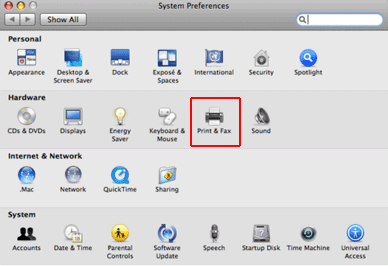
This Apple document says the driver is available for auto-download and install when you add the printer in Print & Scan: OS X has a new paradigm for getting print drivers. Manufacturers give the current driver(s) to Apple to put on its servers. OS X keeps an 'index' of where to find drivers (whether on the server or already installed on your Mac), and when you Add the printer in Print & Scan prefs, or on demand in the print dialog, OS X finds and uses the driver. No need to download and install anything yourself.
Epson Stylus Photo R3000 Driver Windows 10
If your Mac says it can't find the driver, you can force CUPS (OS X's print system) to re-build the index of drivers (both online and already installed drivers) by Resetting Printing System: If you're still not getting it working, you can download and install all the epson drivers from: (you may still need to Reset Printing in order to have the drivers found.). Apple Footer • This site contains user submitted content, comments and opinions and is for informational purposes only. Apple may provide or recommend responses as a possible solution based on the information provided; every potential issue may involve several factors not detailed in the conversations captured in an electronic forum and Apple can therefore provide no guarantee as to the efficacy of any proposed solutions on the community forums. Apple disclaims any and all liability for the acts, omissions and conduct of any third parties in connection with or related to your use of the site.