Free Program For Ntfs Write On Mac
Using the free Mac programs does permit you to write on the NTFS drives but might not be able to control and secure the content that you have stored on the drive. Therefore, it is advisable to go for the paid apps because they are faster, more controllable and secure. Download NTFS Mac 1.0. Driver for reading and writing NTFS volumes. NTFS for Mac is a driver for OS X Leopard that allows you to read and write volumes formatted for the NTFS file system, a feature of Windows operating systems. An excellent program to manage the apps on your Mac. Download NTFS-FREE for Mac OS X for free. This program allows MacOSX to access Microsoft NTFS formatted harddrives connected by USB port. Why can't i text an android phone from my ipad. A modified version of the original Linux code, this program is packaged as a easy-to-use installer so that normal users can install it without hassle.
In addition, Paragon NTFS 15.2.319 Free Download With Serial & Latest Crack + Patch for Mac Full Unique software is complete of protection and very almost accountable for your program actions. Also offers almost all functions to access any rupture on Windows.
You can easily add all sorts of objects to a Word document in Office 2011 for Mac. Word 2011 gives you shortcuts to position an object in your document. Here’s how to get at them: Select an object. On the Ribbon’s Format tab, go to the Arrange group and click the Position button. Choose a position from the gallery. I have a feeling this has to do with the anchors, but I don't know how to unlock and move them. I need to be able to have at least two figures on a page. Right now if I put two figures on a page they try to have the same number in the caption. How to all anchors in word for mac 2011. You can align objects in relation to an anchor, such as the margin, page, and paragraph. You can also enter a precise numeric position for the object in relation to the anchor. Align an object with other objects, the margins, or the page. Click the object to select it. Another way to open the document is to open Word (in the Windows menu on a PC or the Applications folder on a Mac), click File, click Open, then double-click the file. 2 Enable anchor labeling. Word for Mac 2011 More. Which Office program are you using? Objects automatically stack in separate layers as you add them. To change the order of overlapping object, you can move the layers forward and backward. If Reorder Overlapping Objects is not available. Make sure that the document contains at least.
Mac Os Ntfs Write
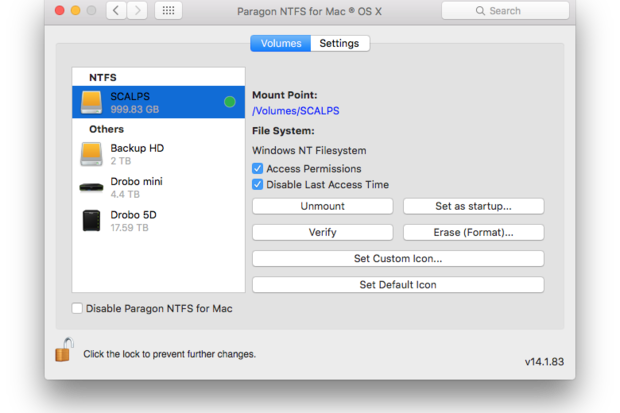
Submit Paragon NTFS for Mac 15 Free Download Latest Version for MAC OS. It is full offline installer standalone setup of Paragon NTFS for Mac 15 crack for macOS. Paragon NTFS for Mac 15 Overview Paragon NTFS for Mac® is fully compatible with Apple’s new security policy ensuring fast, hassle-free and safe access to NTFS partitions from macOS 10.12 Sierra. Cad software for mac.
Once the program is installed, the user can get started right away: conveniently navigate contents and read, edit, copy or create files and folders. The driver guarantees advanced support of NTFS file systems and provides fast and transparent read/write access to any NTFS partition under macOS 10.12. – Unlimited access to NTFS volumes in macOS Sierra! – Full read/write access to NTFS partitions under OS X – Unprecedented high NTFS performance – Easy to install and to use – Verify, repair and format options – Support for macOS 10.12 Sierra Features of Paragon NTFS for Mac 15 Below are some noticeable features which you’ll experience after Paragon NTFS for Mac 15 free download.
Efficiency is everything Paragon NTFS for Mac® is the world’s fastest application, achieving speeds of native drivers, with macOS Sierra! Volume management tools allow formatting, checking and repairing NTFS volumes. How to get paint the town red for free mac. Install it and let it go.