Onedrive For Business Mac Download
OneDrive for Business is an Outlook email storage application that is utilized by many Office 365 clients. Best screen recorder for windows 10. While the application has been available to Mac users, the ability to sync files and take them offline was limited until now.
Error code 17099 outlook. I am getting the following error in Outlook for Mac 2011 Error_____________________________ The folder Inbox cannot be synchronized with the server Details ----------------------------------- You must empty the cache for the folder before it can be synchronized again, To empty the cache, hold down CONTROL and click the folder In the folder list, click Folder Properties, and then empty the cache. If the folder contains thousands of messages, It may take several minutes to synchronize with the server.
Lightworks for Mac OS X Lightworks Console Drivers. For over 25 years Lightworks editor has been at the forefront of film editing, having been used on many of the finest films in cinema history: The Wolf of Wall Street, LA Confidential, Pulp Fiction, Heat, Road to Perdition, Hugo, The King’s Speech and many more! Export video for. Final cut for mac. Experience editing Lightworks in the way it was designed, with a dedicated console, designed to provide a more tactile approach to editing. Buy Console Console driver. MediaInfo (Windows / Linux / Mac) Video and audio file analyzer. Visit website. VLC media player (Windows / Linux / Mac OSX) A free and open source cross. Download Lightworks Pro Video Editor Full Crack. Lightworks is a Video Editor software, which comes with lots of option. Lightworks full version is one of the best software to edit videos and download Lightworks app for pc, but you will notice improvements during the editing of the Video file.
Microsoft on Wednesday released the promised preview of OneDrive for Business for OS X, the first way to sidestep the browser when accessing company documents and the only way so far to sync files for offline use on a Mac. The app requires an Office 365 business-grade subscription, and can replace in most instances the browser UI (user interface) that was previously the only available to OS X users. How do you format a flash drive for mac and pc. A week ago, Microsoft pledged to ship a preview of OneDrive for Business and an updated OneDrive iOS app.
The Redmond, Wash. Company released both on Wednesday. [ Further reading: ] The OneDrive for Business preview on OS X integrates with the Finder, ala Dropbox and iCloud Drive -- the latter, part of Apple's own iCloud storage and sync service. Unlike those alternatives -- or OneDrive, the consumer-grade service Microsoft also offers -- OneDrive for Business is exactly that, focused entirely on documents shared by employees at a company with each other and invited outsiders. It corresponds to the OneDrive for Business client for Windows 7, Windows 8 and Windows 8.1. Once added to the Finder, OneDrive for Business operates as any other local folder -- or for that matter the cloud-based doppelgangers like Dropbox -- allowing drag-and-drop and one-click file launching as usual in OS X.
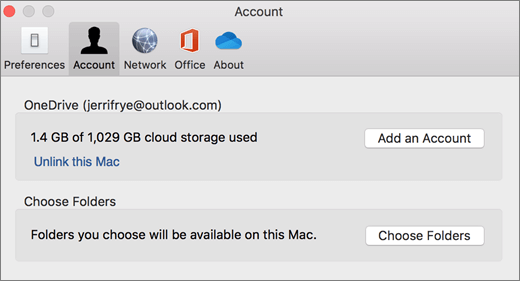
Computerworld briefly tested OneDrive for Business on a Mac, and was easily able to locally synchronize an Office 365 library to a MacBook Pro, upload documents to the cloud, open those stored there using the Finder, and deposit documents into a folder that was previously shared with a manager. [ ] Neither the OS X or Windows OneDrive for Business client lets users share folders; that must still be done from a browser. Office 365 enterprise subscribers now have a 1TB storage allowance, although Microsoft is rolling out to those customers this year. Microsoft also released a revamped OneDrive iOS app whose major enhancement was to combine both OneDrive (consumer) and OneDrive for Business (commercial), but keep the content segregated. For the Mac requires OS X 10.9.5 and later (Mavericks and Yosemite) and can be downloaded from Microsoft's website. The free is available for Apple's App Store.