Use Mac Messnger For Text An Android Phone
Want to text someone on PC or Mac, instead of having to use your phone? You can now send and receive Android text messages on a desktop or laptop computer using Google's new Messages for web. For good measure, go to Apple's site and make sure your phone is out of the Empire's system. You can also transfer existing messages with an app called iSMS2Droid, if you're an archivist like that.
Did you switch from iOS to Android and find yourself missing iMessage? After all, there’s a lot to like about Apple’s text application that features end-to-end encryption, file transfers, and cross-platform support – as long as you’re using either iOS or Mac. Those Android users who happen to own MacBooks and iMacs will be happy to hear that there’s a new app called PieMessage that brings iMessage support to their Android handset.
DON’T MISS: It’s not an official application from Apple, so don’t get too excited just yet. Instead, we’re looking at an open-source project that lets users enjoy an iMessage experience on their Android handset with a twist: The presence of a Mac is needed. The app requires a server to route messages to an Android device. In this case, it’s a Mac that handles the workload: For incoming texts, the Mac will simply route the message towards the Android device. The app is available, and while it may be an exciting piece of software, there’s always the chance that Apple will block this type of functionality in the future – these do-it-yourself solutions may also pose security risks. That said, PieMessage could help you stay in touch with friends and family who are iPhone users by using a chat app they already enjoy. Of course, there are other alternatives for doing that, including regular text messages, WhatsApp, Facebook Messenger, and many others.
Of those,, just like iMessage. A video showing PieMessage follows below. Mac users who are also iPhone users can respond to regular text messages from Android devices directly from the Messages app, assuming their Mac supports the Continuity feature.
ProCase MacBook Pro 15 Case 2018 2017 2016 Release A1990/A1707, Hard Case Shell Cover and Keyboard Cover for Apple MacBook Pro 15' (2018/2017/2016) with Touch Bar and Touch ID -Black by ProCase $15.99 $ 15 99 Prime.  Best 2017 MacBook Pro 13-inch Accessories. Are you looking for 2017 MacBook Pro 13' accessories? Check out our best pick accessories for your new MacBook Pro 13-inch (2016 and 2017 edition) to get the best protection, entertainment, and productivity. Yeah, the MacBook Pro is a nice-looking machine, but if you want to keep it looking gorgeous, then you'll want a quality case for it. For all intents and purposes, TopCase's hard shell is the best value you'll find. I’ll show you my favorite new MacBook Pro cases, skins and covers that fit a variety of needs and styles. If you buy a MacBook Pro in 2018 you are buying one of these models. Best MacBook Pro Cases, Covers and Sleeves in 2016. The market offers a plethora of variations and options but for our list only 10 were chosen. Here are the top 10 best MacBook Pro cases, covers and sleeves in 2016. TopCase Macbook Pro 4 in 1 Bundle. The 4 in 1 bundle from TopCase offers great value for the money as.
'I always need to constantly works on a computer for more than 6 hours a day, but in many situations, my friends or colleague may send messages to ask some technical problem or other things that I need to reply them immediately. I feel it is really troublesome to switch device, especially when my phone in a place far away from me.
Thus, does anybody know how to view Samsung text messages on my desktop PC?' In many circumstances, you may wish to read or view Android text conversation on your computer directly, right? But you also find that you have no right to do it with a simple USB cable, then what will you do?
Android improved lots in security and privacy protect aspect. So when you're simply connecting your Samsung, HTC or LG phones to your computer, perhaps you can't see nothing at all. Don't too nervous about this situation, here is 2 solutions for your reference.
Way 1: Read Android Text Messages on Computer with Android SMS Manager To read or reply Android text messages on your computer, you need the help of the software for Samsung, Huawei, LG, HTC, Sony and etc. With it, you can directly using your keyboards via a simple USB cable.
Using Messenger On Iphone
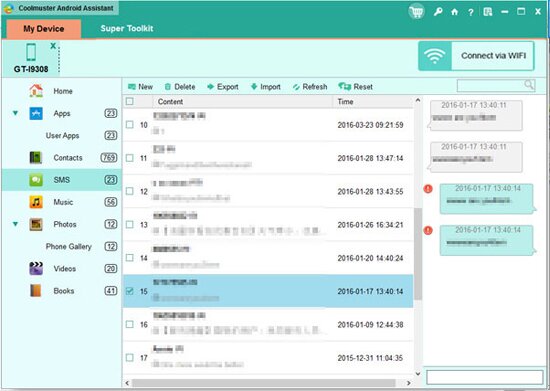
And if you want to view your text conversation later, you can export and save these messages on your computer in readable HTML, CSV or TEXT format with one simple click by using this powerful program. Now, keep reading to following contents to learn the detailed steps.  Run the Android SMS Manager Assume that your Samsung phone is connected to the computer and the program is also installed. Then directly run the program and your device is recognized by the program. Then, you'll see the detailed information about your device will be shown in the main interface. Select the text messages you need Text messages are divided into 'SMS' category on the left sidebar.
So just click it and the program starts to scan out all text messages on your Android phone. Now, you can view the scanned out messages on the program directly. Read Android text messages on computer If you want to view the whole text conversation on your computer, you can select the text messages you want and click 'Export' button to export all messages on your Android phone to computer in HTML, CSV or TXT format, which makes SMS readable on computer. By the way, the BAK and XML format for text messages is not readable on computer, so please choose the output format you need. After that, you can directly open the file and read the conversation without connecting your device to PC as you like.
Brother printer drivers for mac. Read Also: Way 2: View Android Phone SMS on Computer with Android SMS Recovery To export and view Android text messages on PC or Mac computer, you can also depend on the Android SMS recovery software -. 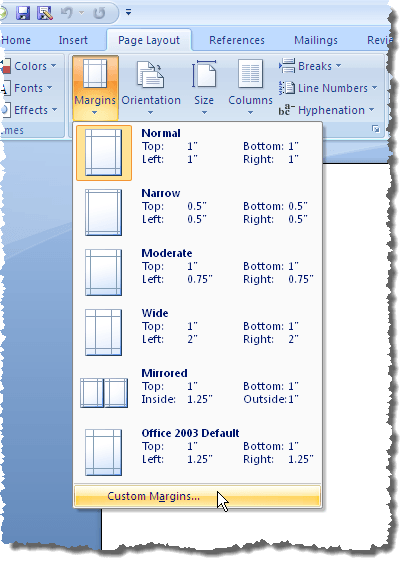 It is an Android data recovery tool that allows you to extract all call history, contacts, text messages, photos, videos, music, documents and more, including deleted ones, from overall Android devices.