Custom Margins For Single Page Word 2016 Mac
Page Margins Page margins are the white space around the top, bottom, left, and right of your document. Margins let Word know where to start placing text at the top of a document, when to move on to the next page at the bottom, where to start typing text on the left side, and where to stop and move to the next line on the right. Changing or setting page margins in Word 2016 only requires a few simple steps. It really doesn't take any time at all once you know where to go and what to do.
To change or set the page margins, click the Layout tab on the ribbon, then go to the Page Setup group. Click the Margins button. It looks like this: Normal margins are one inch margins at the top, bottom, left, and right. To set your own margin, click Custom Margins at the bottom of the dropdown menu. You will then see the Page Setup dialogue box. Enter the margin measurement in inches for the top, bottom, left, and right margins. How to Change the Orientation of a Page When we talk about page orientation, there are two different orientations: landscape and portrait. Landscape and portrait refer to how the document will be displayed on screen and printed. Choose Landscape and your document will be printed horizontally. This is the most common orientation. If you select Portrait, it will be printed from top to bottom (vertically). This is best for professional photos of several people.
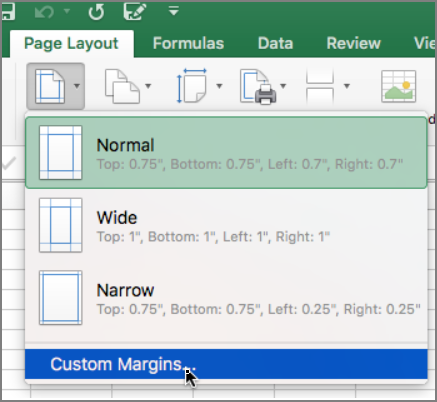
I have tried changing the border, the size of border, as well as page sizes to custom 0 margins (which seems to be the answer that people are raving about on the internet for this sort of problem) etc but it split my document into different pages (even though enough room on single page) and still cut off on PDF preview. Click Layout > Margins > Custom Margins (at the bottom of the Margins gallery). On the Margins tab, enter the values you want. Note: If you want the new margin to be the default every time you open Word, on the Margins tab in the Document box, click Default at the bottom left corner of the box, and then click Yes. In Microsoft Word, you can apply different page orientations to individual pages in a single document. To do so, follow the appropriate instructions below for changing the page setup. Microsoft Word 2010 and 2007 for Windows. Place the cursor at the beginning of the desired page. To start a new page, from the Insert tab, select Page Break. I was having an issue printing with a standard font in Word 2016. Never had an issue before with current printer. The margins were correct in print preview and then it was squashing it all on the hard print out and also in pdf printer. The margin on the left was much larger than the right and the bottom margin was huge. Create a Page Border in Word. To create a custom page border in Word. Apply Different Borders to a Single Page in Microsoft Word. Change the Gridlines in Word on a Mac.
If your document contains several photos, you may want to choose Portrait. To set the orientation, go to the Layout tab. Click the dropdown arrow below the Orientation button. It looks like this. Page Colors Changing the page color is self-explanatory.
To do so, click the Design tab and then the Page Color button. Simply select a color from the menu. To create your own color, click 'More Colors.' Under the Standard tab, you can click on a color to select it, as shown above. If you click the Custom tab, you can use the color picker by clicking your mouse anywhere on the color that you want, then use the slider to adjust the color to create the exact shade you want. To add a gradient, texture, pattern, or picture, click 'Fill Effects' in the Page Color dropdown menu.
Leadpages For Single Page Apps
Want to learn more? Borders can be applied to an entire page, an entire document, or just certain sections of the document.
Despite the fact that all indications on my end say that I should be able to highlight. Preview for mac underlining text when highlight text selected. I guess it's just the way these original files were created? Thanks for all your help.
It only covered CA, as that was before Wells went on the interstate merger spree. 2017 quicken software for mac. TODAY, that system is known as the 'Nationwide Credit Card Authorization Network'. I only relate this because even I don't get 'a piece of the fees'.
Custom Margins For Single Page Word 2016 Mac Tutorial
A border can also be applied to paragraphs. To put a border around a page or a paragraph, go to the Design tab and click the Page Borders button in the Page Background group. It looks like this: When you click the Page Borders button, a new dialogue box opens. Use this window to define the attributes of your border. You can choose to remove a border by clicking the None box.
To create reminders – follow this instructions • Open the reminders app • Add several reminders by typing text • Close a reminder by clicking on the checkbox • To see completed reminders click Show • To set reminder importance – click priority – low, medium or high • Reminder can be scheduled to the time and date • Reminder can be scheduled to the area of map • You can add notes to the reminder • You can add a website link in reminder • You can add messages from the mail app • You can add contact in reminder • You can add places from the map • You can group reminders by adding into the lists. In this article you will learn how to use the reminders app on a MacBook: create lists, add schedules, links, contacts, maps etc. Mac book how to set preferences for reminders.